Extending an ANYbotics ANYmal C with extra sensors: options and limits
Updated 2026-11-14 · YUANZHI ROBOTICS engineering team
You can add most inspection sensors to an ANYbotics ANYmal C: a dual-spectrum gimbal, gas detection, RTK heading, a second LiDAR and 5G. The limit is less the sensor list than the budget. The OEM rates the ANYmal C at about 10 kg of payload, and sensors, brackets, cables and compute all draw from that. Before buying anything, check how much of the rating the set uses, whether the new parts block the built-in LiDAR or depth cameras, and whether power and data have a clean route to the robot.
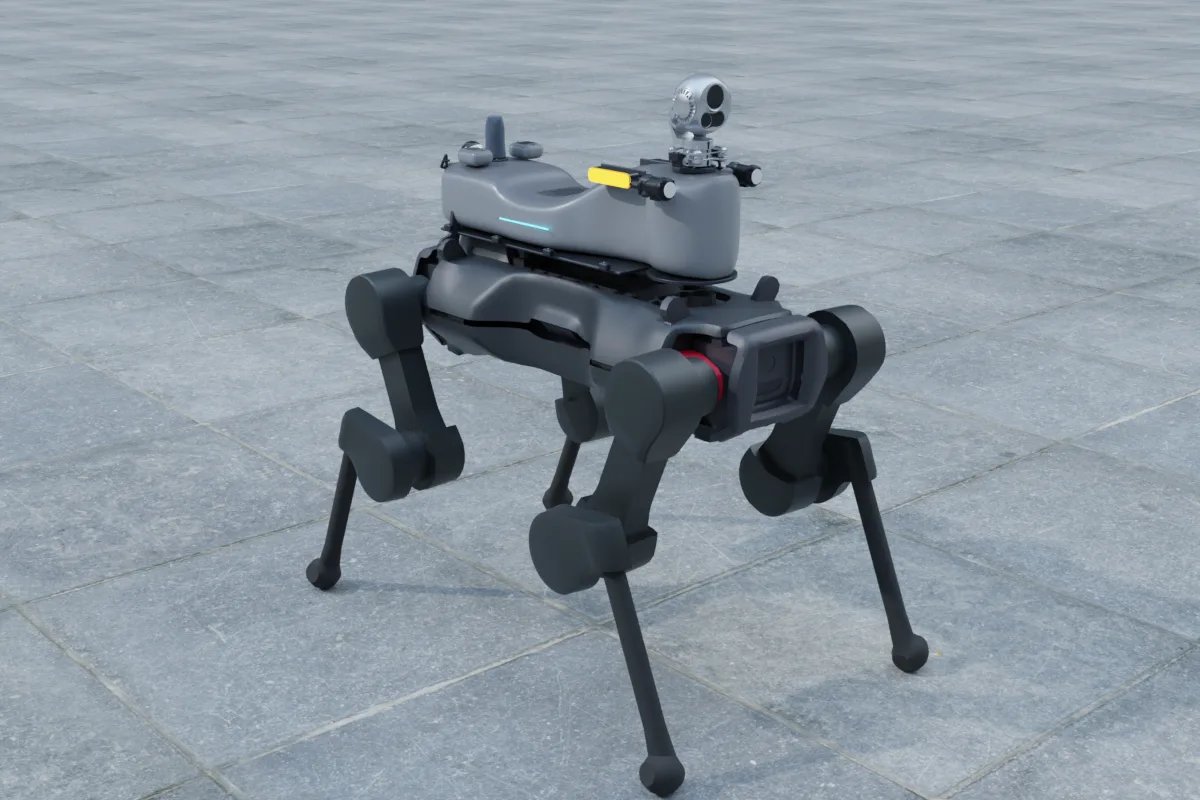
What the ANYmal C already has
Our platform data lists the ANYmal C at about 50 kg, with dimensions of 930 × 530 × 890 mm. Its native perception is a VLP-16 LiDAR and four depth cameras. The rated payload is about 10 kg, an OEM reference value that should be checked against the latest official specification before a design is frozen.
That native set is the starting point. An upgrade should add what the robot cannot measure on its own, such as visible and thermal imaging, gas, acoustic sensing or a radio link. It should not duplicate the depth cameras: a second depth camera covering an area the first one already sees only adds weight.
Four upgrade sets and their weight
The table uses the sensor totals from our configurator. They exclude the compute box, brackets and cables, so the real payload is higher. The percentages are of the 10 kg reference rating.
| Set | What it adds | Sensors only | Share of rating |
|---|---|---|---|
| Minimal smart | One LiDAR and entry compute, with a 4G module for mapping and navigation | 0.27 kg | about 3% |
| Inspection standard | Dual-sensor gimbal, depth camera, RTK heading and 5G video | 2.37 kg | about 24% |
| Gas detection | 4-in-1 gas module, PID sensor, mmWave radar and thermal core | 0.36 kg | about 4% |
| Security broadcast | Dual-sensor gimbal, loudspeaker and light, and a mesh radio | 3.5 kg | about 35% |
Minimal smart is the lowest-cost route to autonomous mapping. Inspection standard is the most common choice for a full inspection round. Gas detection is light because it swaps the large gimbal for small sensors. Security broadcast is the heaviest of the four, so it leaves the least room for later additions.

Choosing sensors by weight
Pick the lightest part that does the measurement. Examples from our catalogue:
- LiDAR: Hesai JT16 at 200 g, Unitree L2 at 230 g, RoboSense Airy at 240 g, Hesai JT128 at 250 g and Livox Mid-360 at 265 g.
- Depth cameras: Intel RealSense D405 at 60 g, D435i at 75 g and Orbbec Gemini 335 at 97 g.
- Gimbals: Hikvision HM-TD5737T-4/W at 2 kg and Hikvision DS-2TD5566T-15/V2 at 4.5 kg. The gimbal is usually the largest single item, so decide on it first.
- Thermal cores: the bare core is small, for example the Teledyne FLIR Boson 640 at 7.5 g. A core is not usable on its own; it needs a lens, a housing and a stable mount, which is why the gimbal mass matters more than the core mass.
Four checks before you mount anything
1. Weight and centre of mass
Add the sensors, brackets, cables and compute, then check the total against the rating with margin for stairs and slopes. Keep the heavy gimbal close to the centre of the body, and keep the centre of mass inside the limits in the robot's documentation. Our weight and power budget guide shows the arithmetic.
2. Sight lines
The VLP-16 and the four depth cameras are what the robot uses to avoid obstacles. A bracket or gimbal in their field of view creates blind spots or reflections, which the navigation stack can treat as obstacles. Test the mount with the robot's own visualisation before you fix it in place.
3. Power
Extra sensors and compute need a regulated supply with fusing, and they should not share a rail with the robot's control electronics. Measure the peak draw, not only the average, because gimbal motors and radios spike. Our power distribution guide covers conversion and protection.
4. Data path
Agree in writing how each new sensor reaches the robot's computer: Ethernet, USB or a serial link. Ask the integrator which ROS 2 drivers are supported and which need custom work. The ROS 2 driver checklist lists what to confirm.
Limits to accept early
The ANYmal C is a platform with its own software and safety functions. Anything added should be treated as a payload that the robot's software reads, not as a change to its control or safety logic. Plan for a sensor-only extension, and do not promise changes to locomotion or certified behaviour unless the manufacturer has agreed to them in writing.
The rated payload is also a ceiling, not a target. Designing the set to a quarter or a third of the rating, as the first two sets in the table do, leaves room for brackets, cable growth and one more sensor later.
How to start
Write down the three measurements you need, for example thermal readings of a bearing, gas at a valve and LiDAR for mapping. Map each one to the lightest sensor in the lists above, then send that list to the integrator for a mount drawing and a power and data plan. The configurator lets you assemble the set on the robot model and read the total weight and peak power before you commit.
Related reading: building an ANYmal-style inspection payload on a lower-cost quadruped and the ANYbotics ANYmal C platform page. For integration work, see the robot payload service and the inspection robot service.
FAQ
How much can an ANYbotics ANYmal C carry?
The OEM reference rating is about 10 kg, and the value should be checked against the latest official specification. Our inspection standard set uses about 2.37 kg of sensors before the compute box, brackets and cables are counted, so there is room. The total still needs margin for stairs and slopes.
Can I add a thermal camera and gas sensors to an ANYmal C?
Yes. The gas detection set in our configurator combines a 4-in-1 gas module, a PID sensor, a mmWave radar and a thermal core, at about 0.36 kg of sensors. A bare thermal core needs a lens and a housing, so the mount has to be designed around it.
Can extra sensors affect the ANYmal C's built-in LiDAR?
They can. A bracket or pod placed in the field of view of the VLP-16 or a depth camera creates blind spots or reflections that the navigation stack can read as obstacles. Check the sight lines with the robot's own visualisation before you fix the mount.
Do I need the manufacturer's agreement to add sensors?
Keep the work to sensor-only extensions that the robot's software reads as payload. Confirm with the manufacturer or in your contract before changing anything that touches locomotion or safety functions.